
Remove Password From a PDF You Can Open: Chrome, Preview, Acrobat
You know the password and you're tired of typing it. These are the routes your computer already has, and when each one falls short.

To remove a password from a PDF you can already open, type the password, then save a new copy without it: print to PDF in Chrome or Preview, change the security setting in Acrobat, or run the file through Unlock PDF. If the file asks for a password when it opens, every route here needs that password, so if you don't have it, ask whoever sent the file.
The routes aren't equal. Printing is the one you already have, but it rebuilds the file, while qpdf and Unlock PDF only take off the encryption.
Which Password Does Your PDF Have?
A PDF can carry two passwords, and the PDF format treats them differently. The user password has to be typed before the file opens at all. The owner password opens nothing: it sets limits such as no printing or no copying.
So look at what happens when you double-click the file. If it asks for a password, you've got an open password and any route below works once you type it. If it opens freely but Print is grayed out, you've got a permissions password, which has its own section below.
Only remove protection from files you own or are allowed to change.
Remove a PDF Password in Chrome
Chrome has a PDF reader and a "Save as PDF" destination built in, so this works on Windows, Mac and Linux with nothing else to install.
- Drag the PDF into a browser window and type the password.
- Press Ctrl+P (Cmd+P on a Mac).
- Set the destination to Save as PDF.
- Click Save and give the copy a new name.
The new file opens without a password.
Remove a PDF Password in Preview on a Mac
Preview's print dialog works the same way.
- Open the PDF in Preview and type the password.
- Choose File, then Print.
- Open the PDF menu at the bottom of the dialog and choose Save as PDF.
- Name the copy and click Save.
What Printing to a New PDF Changes
Printing draws the pages again, so you get a new file, not the same PDF. If you need its bookmarks, form fields or links, Unlock PDF kept 2 bookmarks, 2 links and a form field on our locked test file in November 2026 (Chrome on a Mac).
For a statement you just want to read, that's fine. For a form you still have to fill in or a long report with bookmarks, use one of the routes below.
Remove a PDF Password in Adobe Acrobat
These are the steps on Adobe's own page, as we read it in November 2026.
- Open the PDF and type the password.
- Choose Tools, then Protect, then Encrypt, then Remove Security.
- Accept for an open password, or type the permissions password if the file has one.
- Click OK and save the file.
Remove It Online With Unlock PDF
A printed copy isn't always good enough. Our free tool writes a copy with no encryption and doesn't redraw the pages.
- Upload the PDF to Unlock PDF, up to 25 MB.
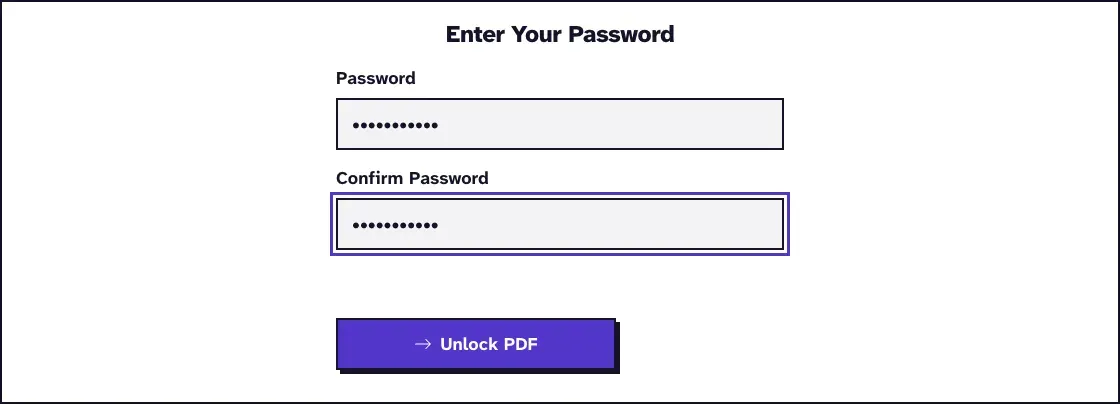
- Type the password in the Password and Confirm Password fields.
- Click Unlock PDF.
- Download the copy, which opens without a password.
We ran our test file protected.pdf (1.6 KB, one page) through it in October 2026. The unlocked copy was 1.3 KB and one page.
The file travels to our server over HTTPS and is deleted within two hours. If that isn't acceptable for this document, stay with a route on your own computer.
What If the File Only Restricts Printing or Copying?
Unlock PDF needs the permissions password, so ask the owner for it or for an unrestricted copy. We set up a test file that opens freely and blocks printing and changes, then ran it through the page in November 2026, in Chrome on a Mac.
The permissions password gave us a copy with no restrictions. A wrong one got "Incorrect password. Please check and try again."
Remove It on the Command Line With qpdf
For many files, or a machine you'd rather keep everything on, qpdf is free and it's what our tool runs on the server. On Debian it's apt install qpdf, and the project offers macOS downloads in its releases area.
1qpdf --password=YOUR_PASSWORD --decrypt locked.pdf unlocked.pdfWe ran that with qpdf 12.2.0 on Linux. The password ends up in your shell history this way, and the --password-file option reads it from a file instead.
What to Do After the Password Is Gone
Anyone who gets the unlocked copy can open it, so keep it somewhere only the right people can reach, and keep the protected original too.
If you only needed the password off for a moment, put a new one on afterwards. Our guide to adding a password back covers the options on each device.
A password also isn't the only thing that can give a document away once it's out of your hands. Our guide on how to remove personal information from a PDF goes through names, comments and form entries before you send it on.
Frequently Asked Questions about Remove Password From PDF
Can I remove a password from a PDF without knowing it?
Not if it asks for one when it opens: every route here needs it. Our Unlock PDF tool also asks for a permissions password, and it doesn't guess or crack anything. Ask the sender or the document's owner for the password or for an unprotected copy.
Why is Print grayed out on my protected PDF?
The file has a permissions password that blocks printing. Type its permissions password into Unlock PDF or Acrobat, with the owner's say-so.
Does removing the password change the PDF's content?
Not with qpdf or Unlock PDF, which keep the pages as they are and only drop the encryption. Printing to a new PDF rebuilds the file.
Is it safe to remove a PDF password online?
Files go over HTTPS to our own server and are deleted within two hours, and you don't need an account. For a document that shouldn't leave your computer at all, use Chrome, Preview or qpdf.