
PDF Viewer Online: Open, Read and Search a PDF in Your Browser
This PDF viewer opens a PDF right in your browser: scroll through the pages, zoom, jump to a page, search the text, copy it and print. The file is read on your device and never uploaded.
// how it works
How to view a PDF online
- 01Pick a PDF on your device or drop it on the page.
- 02Scroll, zoom or type a page number to move through it.
- 03Search for a word, copy text or click Print.
// why pdf-file
What the PDF viewer does
- Nothing uploadedpdf.js opens the PDF inside your browser, so the file never leaves your device.
- Search the textFind every place a word appears and step from one match to the next.
- Select and copyText sits in its own layer over each page, so you can select it and copy it.
- Zoom and jumpZoom from 50 to 300 percent, fit the page to the width or type a page number.
- PrintSend the PDF straight to your printer from the viewer.
- Works on phones tooIt runs in any current browser on a computer, tablet or phone.
How to open and read a PDF online
Most of the time you just want to read a PDF: check a page, find a sentence, print it. This viewer opens the file in your browser tab. There's no app to install and no account.
The PDF stays on your device the whole time. Nothing gets uploaded to our server.
Open a PDF NowHow to view a PDF online
- Click Upload PDF and pick a file on your device, or drop it on the page.
- Scroll, zoom or type a page number to move through it.
- Search for a word, copy text or click Print.
Move through the pages
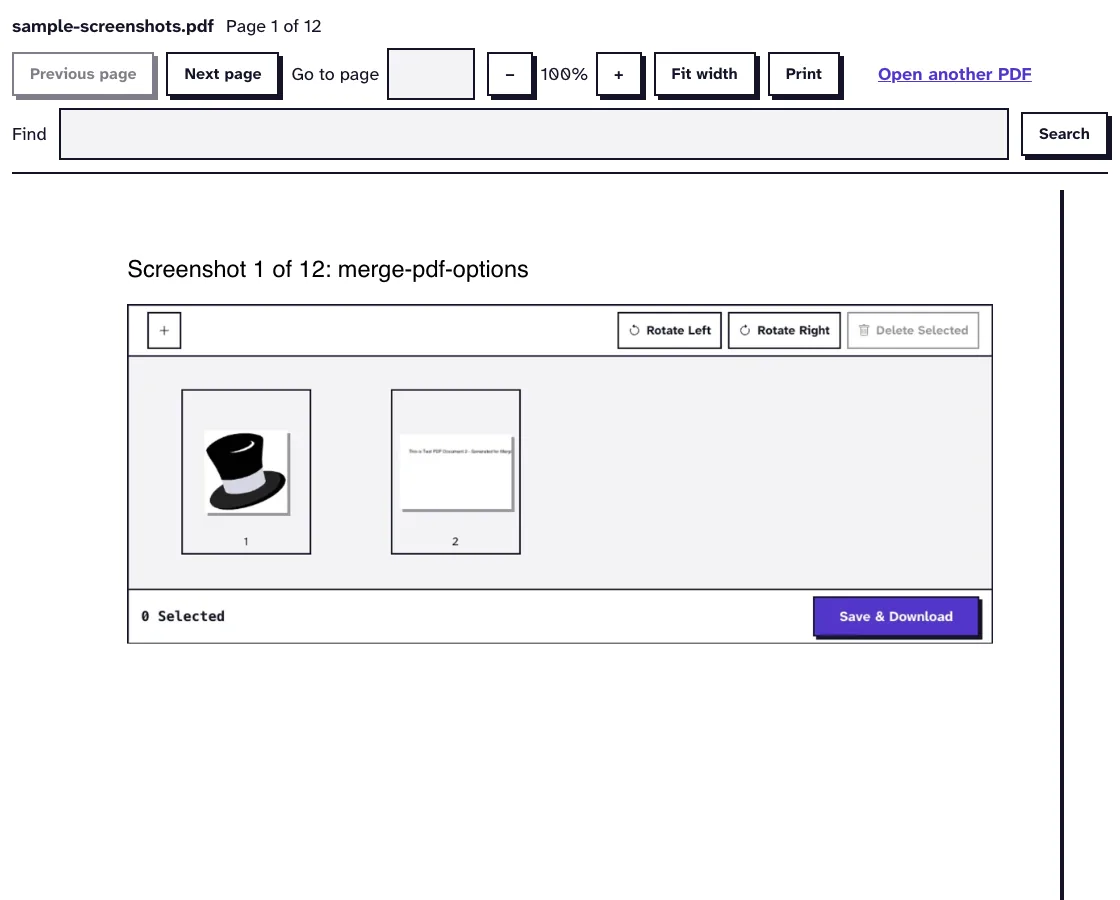
All pages sit one below the other, and each one is drawn when you scroll near it, so even a long file opens quickly. The toolbar tells you which page you're on and how many there are.
Type a page number to jump there, or use Previous page and Next page. Zoom goes from 50 to 300 percent. Fit width makes the pages as wide as the window.
Search and copy text
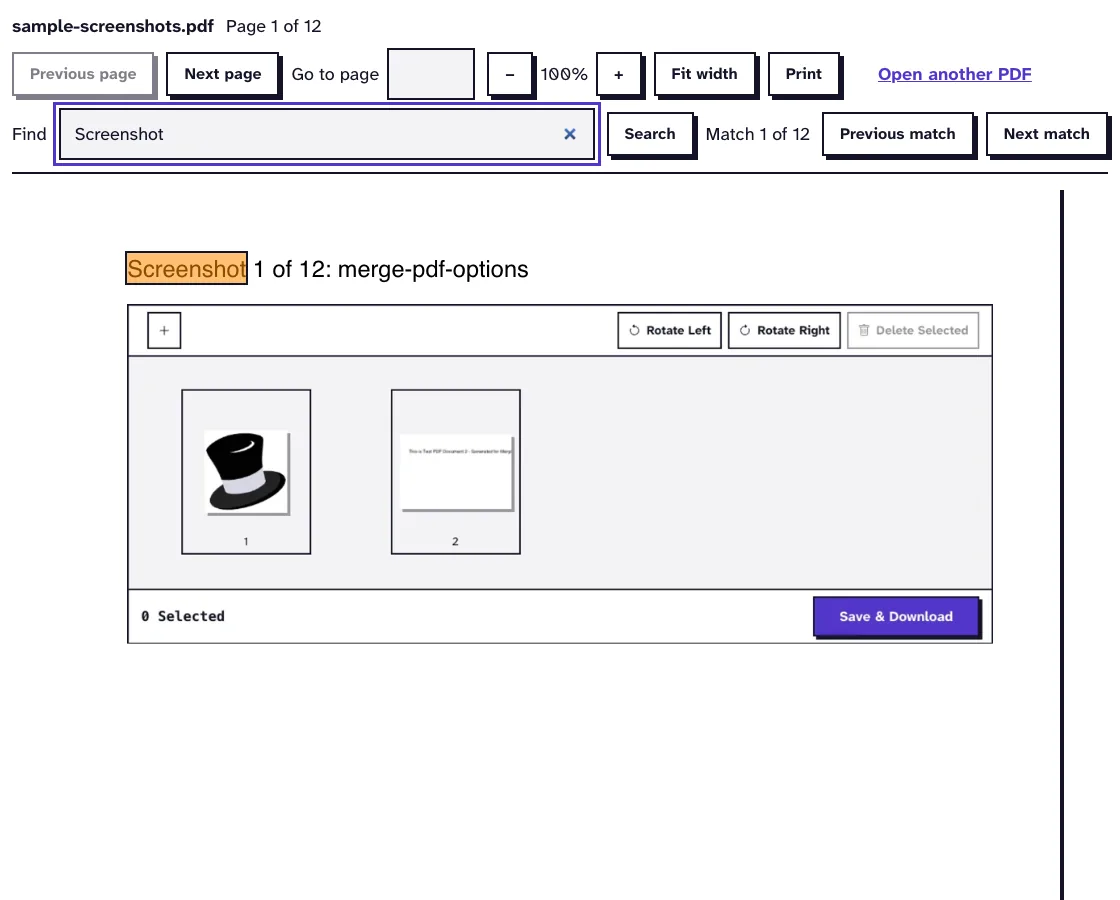
Type a word in Find and press Enter. Every match gets marked on the pages and the first one scrolls into view, and Previous match and Next match step through the rest.
The text of each page lies in an invisible layer over the picture of the page, the same way pdf.js does it in Firefox. You can select it and copy it like text on any web page.
Why the file never leaves your device
The viewer reads the file you pick inside the browser tab and draws it there. No request carries your PDF to our server, so there's nothing for us to store or delete.
Close the tab and it's over. To open a different file, click Open another PDF.
When copied text comes out garbled
Some PDFs store their letters as shapes without saying which character each shape is. The page looks fine, but copied text turns into symbols and search finds nothing.
Run a file like that through OCR PDF and the recognized text gets laid over each page image as an invisible layer, so search and copy work on it. Scans are the same story: they hold no text at all until OCR reads them.
Blank pages, long files and damaged files
A long PDF opens fine here. A damaged one may not open at all until it's repaired. We joined our 12-page sample 42 times into a 504-page file of 3.2 MB: page 1 was drawn 0.1 seconds after we chose it, and when we scrolled through, all 504 pages were drawn in 16.8 seconds, none of them blank.
A 3 KB test file with a broken cross-reference table gave "Failed to load PDF file" and no pages, because pdf.js (which draws the pages here and in Firefox) couldn't read it. After Repair PDF, one of our tools that fix and shrink PDFs, the same file opened with all 5 pages drawn.
So if your browser shows blank pages for one file only, try that file here first, and repair it if it won't open. One limit of our test: we ran it in headless Chrome on our own server, not in the built-in viewers of Chrome or Edge.
What the viewer does not do
A PDF that needs a password to open has to be unlocked first with Unlock PDF. A scanned PDF shows its pages, but search finds nothing because the text is part of a picture, and OCR PDF adds the recognized text as an invisible layer so search can find it.
You'll see form fields, but you can't type into them here. Use Fill Out PDF Form for that, and to keep pages as images, use PDF to JPG or another of our tools that convert a PDF to other formats.
What happened when we tested the PDF Viewer
We opened sample-screenshots.pdf, a 12-page test file of 3.1 MB. In our browser, page 1 was drawn 0.1 seconds after we chose the file, and a search for "Screenshot" found 12 matches.
Tested in October 2026.
Frequently Asked Questions about Viewing PDFs Online
Is my PDF uploaded when I view it?
No. The file is opened and drawn in your browser, and no copy gets sent to our server.
Can I edit the PDF in the viewer?
No, the viewer only shows the file. To edit, convert or sign it, use the tools in the menu.
Does it work on a phone?
Yes. It runs in any current browser on a computer, tablet or phone.
How large can the PDF be?
Files up to 100 MB open, since nothing's uploaded. Very long files take longer to search.
Loved PDF-File.com? Spread the word!
Help us keep these tools free: Share with your friends!