
Bates Numbering for PDF: Number Every Page Across Files
Bates numbering gives every page of a document set its own label, like ACME000001, so any page can be cited in a lawsuit or a records request. Add one or more PDFs, set a prefix, the first number and the digits, and the count runs on from one file to the next.
// how it works
How to add Bates numbers to PDFs
- 01Upload one or more PDFs, in the order you want them numbered.
- 02Click Choose Options.
- 03Set the prefix, first number, digits, suffix and position.
- 04Click Add Bates Numbers and download the PDF, or a ZIP for several files.
// why pdf-file
What the Bates numbering tool does
- Numbers run across filesThe second file picks up where the first one ended, in the order you added them.
- Prefix and suffixPut a case or party code before the number, and another code after it if you like.
- Zero paddingChoose 3 to 10 digits so labels sort properly: ACME000099 comes before ACME000100.
- Six positionsThe label goes in any corner, or centered at the top or bottom of each page.
- Files named by rangeIn the ZIP, each file name starts with its first Bates number.
- Deleted within two hoursWe delete your upload and the result from our server within two hours, and share nothing.
How to Bates number PDF documents
In a lawsuit or a records request, every page that changes hands needs its own number, so that anyone can point to page ACME000437 without confusion. That system is called Bates numbering, after the numbering stamp that made it common.
This tool stamps those numbers onto your PDFs and keeps counting from one file to the next. It’s free, and you don’t need an account.
Add Bates Numbers NowHow to add Bates numbers to PDFs
- Click Upload PDF and pick one or more files, in the order they should be numbered.
- Click Choose Options.
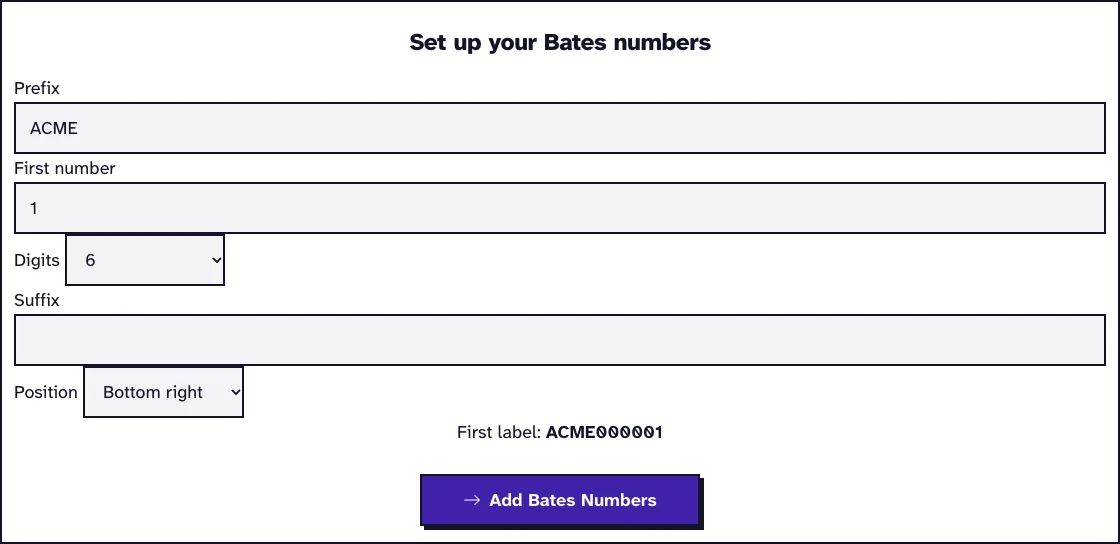
- Set the prefix, first number, digits, suffix and position.
- Click Add Bates Numbers and download the PDF, or a ZIP for several files.
How a Bates label is built
A label has up to three parts: a prefix, a number padded with zeros and a suffix. With prefix ACME, first number 1 and six digits, the first page reads ACME000001.
The zeros keep every label the same length, so they sort properly in a file list or a spreadsheet. Pick enough digits for the whole production; six digits cover 999,999 pages.
The prefix and suffix take up to 40 characters each, enough for a party name or a case code. The label prints in 10 point black text, 24 points from the edges, in whichever corner or center spot you choose.
Adding CONFIDENTIAL next to the number
Type the designation into the suffix field with a space in front, and it prints right after the number, in the same label. In our October 2026 run, prefix ACME, 6 digits and the suffix " CONFIDENTIAL" gave ACME000001 CONFIDENTIAL on page 1, as searchable text.
The designation doesn’t get a position of its own; it always sits in the same corner as the number. If your protective order wants CONFIDENTIAL in another corner, add it as a second mark with Add Stamp, which has its own position setting.
The suffix takes 40 characters, and even a long label fits a small page: SMITH-PROD-000003 CONFIDENTIAL ATTORNEYS EYES ONLY measured 4.2 inches wide and still fit on a 3 by 5 inch index card, 0.4 inch from its left edge. The label never gets shrunk, though, so on a card anything longer than about 4.7 inches would start off the page.
How big the label prints on small and large pages
The label is always 10 point text, so it’s the same physical size on every page: about 3.5 mm tall. We numbered a Letter page, an A3 page and a 3 by 5 inch card in one file, and each label came out in the same 10 point type, ending 24 points from the right edge.
On an A3 drawing the label is easy to miss, and on a card it takes up 40 percent of the width (ACME000001 CONFIDENTIAL is 2 inches long). You can’t change the size, so on large formats tell the reviewer to look in the bottom right corner.
Labels survive compression. After Compress PDF at Max, all three labels were still text a search finds, in an embedded DejaVu Sans font, so you can number first and compress for an e-filing limit afterwards.
Numbering several files in one run
Add all the files of a production together. They’re numbered in the order you added them, and each file picks up where the previous one ended.
You get one ZIP file, and each PDF inside starts with its first Bates number, such as ACME000013 contract.pdf. So the file names alone tell you where each document sits in the sequence.
Keep a log of your Bates ranges
Write down the first and last number of every file you produce, with the date and the recipient. The ZIP file names already start with each file’s first number, which makes that list quick to put together.
Use one prefix per party or per case, and never reuse a number. If documents get added later, start the new run at the number after the last label you produced.
Check the result before you produce it
Open a few pages and make sure the label isn’t covering text, signatures or existing stamps. If it is, run the tool again with another position.
Courts and agencies can have their own rules for where labels go and how prefixes look, so check what the receiving party wants. For plain page numbers without a prefix, Add Page Numbers is simpler, and Merge PDF joins numbered files into one.
What happened when we tested Bates Numbering
We uploaded sample-screenshots.pdf, a 12-page test file of 3.1 MB, and set prefix ACME, first number 1, 6 digits, bottom right. The tool returned sample-screenshots_Bates.pdf, 3.1 MB with 12 numbered pages, 0.2 seconds after we pressed the button on our local test server.
Tested in October 2026.
Frequently Asked Questions about Bates Numbering
What is a Bates stamp?
It’s the label a Bates number is printed as: a prefix and a running number on every page. Lawyers also call it a Bates label.
Can I continue numbering from an earlier production?
Yes. Set the first number to the one after the last label you used, and keep the same prefix and digits.
Does the tool change the content of my pages?
It only adds the label, as new text on top of each page. Everything else stays as it was.
Are my files kept?
No. The uploads and the numbered files are deleted from our server within two hours.
Loved PDF-File.com? Spread the word!
Help us keep these tools free: Share with your friends!