Convert PDF to Image: Which Format and Resolution to Pick (JPG, PNG, TIFF, SVG)
We ran the same PDFs through each format. Here's what came out, how big it was, and which one fits your job.
To convert a PDF to an image, pick the format first: PDF to PNG for pages with text, charts or screenshots, and PDF to JPG for pages full of photos. Upload the file, choose all pages or just some, and download a ZIP with one image per page.
That format choice changes more than people expect. In our runs the same file came out almost five times bigger in the wrong one.
Which Image Format for Which PDF
| Your page or job | Format | Why |
|---|---|---|
| Text, charts, screenshots, slides | PNG | Lossless, and usually smaller than our JPGs |
| Photos, or a site that only takes JPEG | JPG | Far smaller on photo pages |
| An archive, scanning system or print shop that asks for it | TIFF | 24-bit color, lossless LZW |
| A logo or chart for the web or a design tool | SVG | Stays sharp at any size |
JPG vs PNG: What Our Test Files Showed
Our converters render every page at 300 DPI, so the size difference comes down to the format alone. Our JPGs are saved at quality 100, which is why they aren't the small option you might expect.
| Test PDF (November 2026) | As JPG | As PNG |
|---|---|---|
| 5 text pages (test3.pdf) | 740,868 bytes | 157,813 bytes |
| 12 screenshot pages | 4,874,937 bytes | 3,062,576 bytes |
| 5 A4 pages of photographs | 25,923,753 bytes | 65,549,339 bytes |
So use PNG unless the page is mostly photos. JPEG at quality 100 loses very little, but text edges are where you'd see it: on a screenshot page we compared, no JPG pixel differed from the PNG by more than 19 of 255 levels.
If you want sharp JPGs specifically, our guide to getting high quality JPGs from a PDF goes further into it, and fixing blurry text in PDF to JPG helps when letters look soft.
What Resolution Do You Need?
DPI is how many pixels each inch of the page gets. Our tools use 300 DPI, and you can't change it, so an A4 page becomes about 2480 by 3508 pixels.
That's enough to print the page or zoom into small text. It's more than a web page or a slide needs, so if you need a small file, scale the image down in an image editor after converting. Starting big and shrinking gives you a better result than the other way round.
Will the Image Fit a Portal's File Size Limit?
A text page fits nearly any limit, at about 32 KB as our PNG, but a full-page photo stays over 4 MB until you lower the resolution. Here's one page from each of our three test PDFs, in November 2026:
| One page | Our JPG, 300 DPI | Our PNG, 300 DPI | JPG at 150 DPI | JPG at 96 DPI |
|---|---|---|---|---|
| Text | 148 KB | 32 KB | 36 KB | 19 KB |
| Screenshot | 277 to 572 KB | 108 to 469 KB | 62 to 107 KB | 32 to 58 KB |
| Full-page photo | 4.8 to 5.5 MB | 12.3 to 14.0 MB | 480 to 550 KB | 227 to 255 KB |
So a 1 MB limit takes a photo page at 150 DPI, and a 200 KB limit wasn't met by any photo page, even at 96 DPI. Only the first two columns come from our tools, which have no DPI or quality setting.
The last two came from Ghostscript at JPEG quality 80. Install it with brew install ghostscript on a Mac or sudo apt install ghostscript on Debian or Ubuntu, then run this for 150 DPI, about 1240 by 1754 pixels on A4:
1gs -q -dSAFER -dBATCH -dNOPAUSE -sDEVICE=jpeg -r150 -dJPEGQ=80 -sOutputFile=page-%d.jpg input.pdfChange 150 to 96 for about 794 by 1123 pixels. Check that small print is still readable before you upload.
TIFF and SVG: When the Usual Two Don't Fit
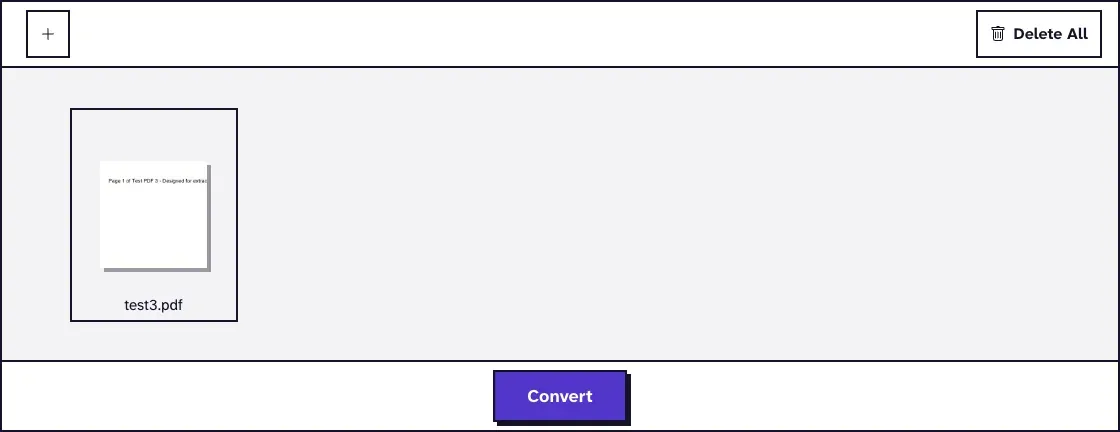
PDF to TIFF makes one 300 DPI, 24-bit RGB file per page with lossless LZW compression. It's what you send when an archive or scanning workflow asks for TIFF, and otherwise it's big: our five nearly blank pages of test3.pdf took 1,505,479 bytes, about 301 KB each.
PDF to SVG is a different kind of image. Lines and shapes stay vector paths and text becomes outlines, so it stays sharp at any size and looks exactly like the PDF. The same five pages came as a 31.5 KB ZIP, against 160.5 KB for the TIFF ZIP.
SVG suits a logo or a chart. A page containing photos stays a page with photos in it, so it doesn't gain anything there.
How to Convert a PDF to Image Files Online
- Open PDF to PNG or PDF to JPG and upload one PDF of up to 25 MB.
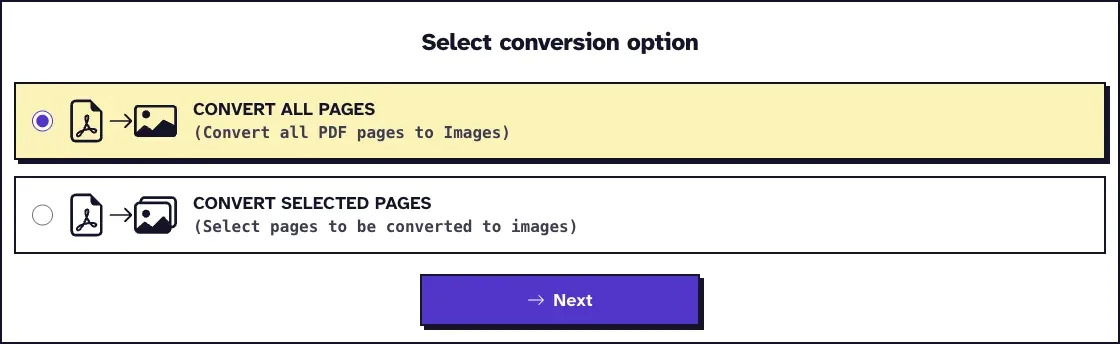
- Choose Convert All Pages, or Convert Selected Pages if you only need some.
- Click Next. With selected pages, click the previews you want first.
- Download the ZIP, which holds one image per page, named Page-1, Page-2 and so on.
We converted our 12-page, 3.2 MB screenshot PDF with the defaults. The ZIP came to 2.4 MB for JPG and 2.7 MB for PNG, and the unpacked PNGs were the smaller set, as the table shows. If the pages are going into a Word document, our guide to inserting a PDF into Word shows how to place them.

A Whole Page or Just the Picture on It?
These tools photograph the whole page. If you want the chart or photo sitting inside it, at its original quality, use Extract Images instead. It pulls out the pictures stored in the file without rendering anything.
Our guide to exporting images from a PDF explains why some graphics don't come out that way: anything drawn with lines and shapes isn't stored as a picture, so render that page instead.
What You Lose When a PDF Becomes an Image
An image holds a picture of the text, so you can't select or search it. Turning PNGs back into a PDF doesn't bring it back: our 12-page sample lost its 60 words of text that way.
Keep the original PDF, and convert from that again whenever you need a new copy. If you're going the other way later, our guide to turning an image into a PDF without losing quality covers that direction.
Frequently Asked Questions about Convert PDF to Image
Is PNG or JPG better for a PDF page?
PNG for text, charts and screenshots, where it was smaller and lossless in our runs. JPG for pages full of photos, where it was less than half the size of PNG.
Can I choose the DPI?
Not in our tools. JPG, PNG and TIFF are all rendered at 300 DPI. Scale the image down afterwards if you need something smaller.
Can I convert only one page?
Yes. Choose Convert Selected Pages, click the page you want in the preview, and you'll get a ZIP with that image.
Does converting add a watermark?
No. You don't need an account either, and your files are deleted from our server automatically within two hours.