
TIF to PDF: How to Convert TIFF Scans, Faxes and Multi-Page Images
Turn single and multi-page TIFF files into one PDF without losing detail, and know when the PDF gets bigger instead of smaller.

To convert TIF to PDF, upload the .tif or .tiff file to a TIFF to PDF converter, put the pages in order and download one PDF. Our free tool keeps every page of a multi-page TIFF and stores each one without lossy compression, so the scan stays as sharp as it was.
On a Mac, Preview can export a PDF too, but check its pages. Here's when each route makes sense, and what to expect from the file size.
What a TIF File Is and Why People Convert It
TIF and TIFF are the same format with two spellings of the file ending. TIFF (Tag Image File Format) is a raster image format that can hold several pages in one file, which is why scanners, fax services and archives still use it.
The trouble is opening it. MDN's image format guide says that, other than Safari, browsers don't natively support TIFF in web content. A PDF of the same pages is the easier file to send.
How to Convert TIF to PDF Online
TIFF to PDF works in any browser, on Windows, Mac or a phone.
- Click Choose Files, or drag one or more TIFF files (up to 25 MB each) onto the upload area.
- Drag the thumbnails into the order you want, and rotate any that came in sideways.
- Choose the page size (A4, Letter or Fit to Content), the orientation and the margin.
- Leave "Merge all images in one PDF file" ticked for one PDF, or untick it for one PDF per TIFF.
- Click Convert To PDF and download the result.
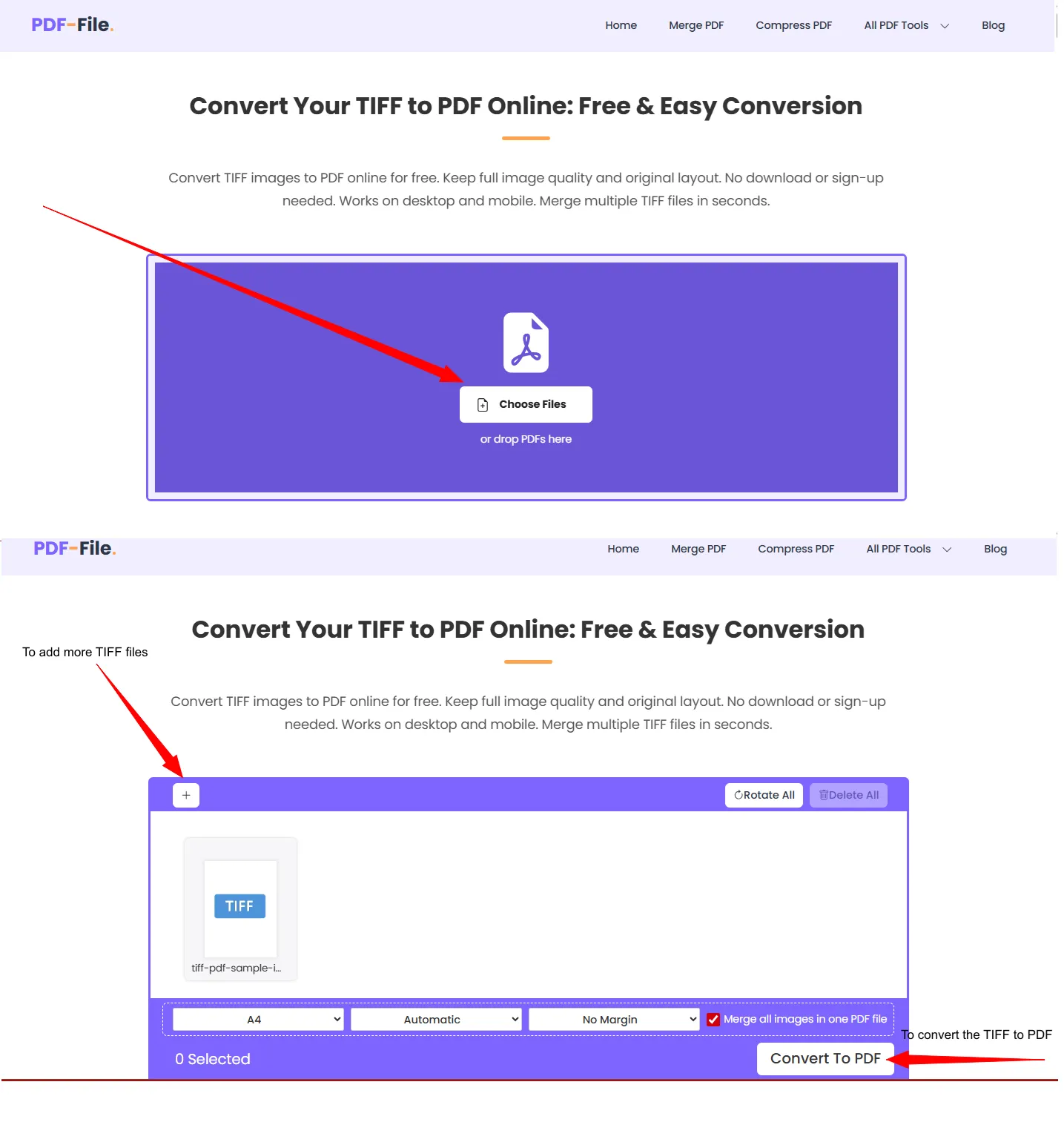
We ran our small test.tiff (10.9 KB) through it with the defaults in November 2026. The PDF was 6.1 KB and one page, and because the image was wider than tall, Automatic orientation made it a landscape A4 page.

Multi-Page TIFFs and Stacks of Scans
Every page of a multi-page TIFF becomes a PDF page, in the order it's stored. We converted a 10-page TIFF with six paper sizes, from A6 to Legal, and all 10 pages came through at their full pixel size.
With the default A4 page, every page lands on an A4 sheet: a Legal page gets shrunk and an A6 page drawn larger. Pick Fit to Content if each page should keep its own paper size. An animated GIF is the opposite case, since only its first frame makes it into the PDF (our GIF to PDF guide explains why).
Uploading several files at once? Check the thumbnail order before you convert.
Our guide to assembling multiple TIFF scans into one PDF goes through a whole stack, and the one on converting a scanned fax TIFF to PDF covers fax files.
Which TIFF Compressions Lose Pages on Our Converter?
None of the ten we tried. We built a 3-page TIFF with different pages in each compression below, converted them in November 2026 with the defaults, and all came back as 3 pages, each matching its own source page when we compared the renders.
| TIFF compression | TIFF size | PDF size | PDF pages |
|---|---|---|---|
| CCITT Group 4 (fax) | 3.2 KB | 29.3 KB | 3 |
| CCITT Group 3 (fax) | 18.6 KB | 29.3 KB | 3 |
| LZW, black and white | 11.3 KB | 29.3 KB | 3 |
| LZW, color | 45.6 KB | 45.5 KB | 3 |
| LZW with predictor | 54.0 KB | 45.5 KB | 3 |
| Deflate | 48.3 KB | 45.5 KB | 3 |
| JPEG | 68.5 KB | 71.3 KB | 3 |
| PackBits | 143.8 KB | 45.5 KB | 3 |
| WebP | 14.6 KB | 60.2 KB | 3 |
| None | 7.9 MB | 45.5 KB | 3 |
Four of them (Group 4, JPEG, LZW and Deflate) also went through the web page itself, with the same page count. These are plain test pages, so read the sizes against each other only.
Will the PDF Be Smaller Than the TIFF?
In our runs, yes for LZW, Deflate, PackBits and uncompressed color TIFFs; TIFFs saved as JPEG or WebP grew. Each page goes into the PDF as a lossless PNG image. Also in our runs, a 300 dpi color scan went from 971.5 KB to 230.3 KB, and a 600 dpi gray scan from 1.2 MB to 266.7 KB.
Black-and-white pages can grow too. They're stored as 8-bit images in the PDF, so a nearly empty fax page went from 856 B to 19.6 KB.
Still too big to send? Compress PDF cut a grainy 2.7 MB color page down to 50.4 KB in our test, with screen text still readable. It doesn't always help, though, so keep whichever file is smaller.
Convert TIF to PDF on a Mac
Open the TIFF in Preview, choose File, then Export, and pick PDF in the Format menu, as Apple's guide to converting image files describes. With a multi-page TIFF, check the page count and that page 2 differs from page 1.
For several TIFF files, select them in Finder, Control-click and choose Quick Actions, then More, then Create PDF. On Windows, use the online tool above, and for a mix of images and Office files see our guide to converting multiple files to PDF at once.
Things the Conversion Doesn't Do
- Searchable text. The PDF holds pictures of the pages. Add a text layer with OCR PDF, which reads English text.
- CMYK colors. PNG has no CMYK, so a CMYK print TIFF comes out as RGB. If a print shop needs CMYK, send them the original TIFF.
- Going back. For PDF to TIFF, use our PDF to TIFF converter.
Frequently Asked Questions about TIF to PDF
Is TIF the same as TIFF?
Yes. .tif and .tiff are two endings for the same format, and converters treat them alike.
Does converting TIF to PDF lose quality?
Not with our tool. Each page goes in as a lossless PNG image with all its pixels.
Can I combine several TIF files into one PDF?
Yes. Upload them together, drag them into order and leave "Merge all images in one PDF file" ticked.
Can I edit the text in the PDF after converting?
Not directly, because the pages are images. Run the PDF through OCR first so its text becomes searchable and copyable.
Why is my PDF bigger than the TIF file?
Black-and-white TIFFs use one bit per pixel, while the PDF stores the page as an 8-bit image. A TIFF saved with JPEG or WebP compression can grow as well. Compress the PDF, or keep the TIFF if size matters more than compatibility.