Chat with PDF: Ask Questions & Get Answers Instantly (2026 Guide)
We show you to how to get instant answers from your document with AI

What Is Chat with PDF?
How AI-Powered PDF Chat Works
Upload a PDF and ask questions in plain English. The AI reads your entire document and gives you answers right away.
Actual example: A graduate student needed to review 23 research papers for a thesis. Reading each paper fully would have taken 40+ hours. Using Chat with PDF, she asked "What are the main research questions in each paper?" and received structured summaries from all 23 documents in under an hour, identifying 4 papers directly relevant to her work.
The system reads your document and maps out its content, figures out what you're asking about, finds the exact sections that answer your question, and gives you a response with references to the source. Unlike searching with Ctrl+F, this tool actually understands what you mean. Ask about "reimbursement policies" and it knows that related terms like "expense coverage" might be relevant too.
Chat with PDF vs Old-Style PDF Readers
Old readers force you to scroll through everything manually. You hunt for keywords, flip between pages, and piece together information yourself.
Chat with PDF flips the script. In a traditional reader, you do the searching yourself. With this tool, a smart assistant handles it for you. The comparison is stark: old readers make you hunt for information, as Chat with PDF lets you just ask. Old readers make you read around context to understand it, as AI explains it directly. Cross-referencing in old readers means flipping pages repeatedly; AI handles it automatically. Large documents feel overwhelming in old readers but are effortless with Chat with PDF.
Why Use Chat with PDF Instead of Reading Everything?
The average knowledge worker gets interrupted every 11 minutes. Reading a complex document with those interruptions eats up serious time. A 30-page contract takes 2-3 hours to read carefully. Chat with PDF gets you the answers in minutes — need to know about key obligations? 60 seconds. Liability clauses? 30 seconds. Termination conditions? 45 seconds. One legal pro reported handling 3x more contracts per week after switching to AI document analysis.
"I used to spend hours hunting through contracts. Now I get answers in seconds." — Legal associate at a Fortune 500 firm
Pull Specific Facts Without Skimming
Traditional reading means consuming entire documents even when you only need one piece. You might read 40 pages to find one clause buried on page 38. Chat with PDF fixes that. Ask "What is the late payment penalty?", "What are the auto-renewal terms?", or "Who owns the intellectual property rights?" and the AI gives you the exact answer with page references. You can verify it or dig deeper if needed.
Works on Any PDF: Contracts, Reports, Research Papers
This tech handles all kinds of docs — legal contracts covering terms, obligations, and liability; business reports with metrics, trends, and recommendations; research papers with methods, results, and conclusions; financial statements with figures and disclosures; employee handbooks with policy questions; academic papers with findings and data. The AI adapts to each document's style and terminology. For longer documents, consider pairing Chat with PDF with AI summarization to quickly identify which sections need deep reading.
How to Use Chat with PDF Tool
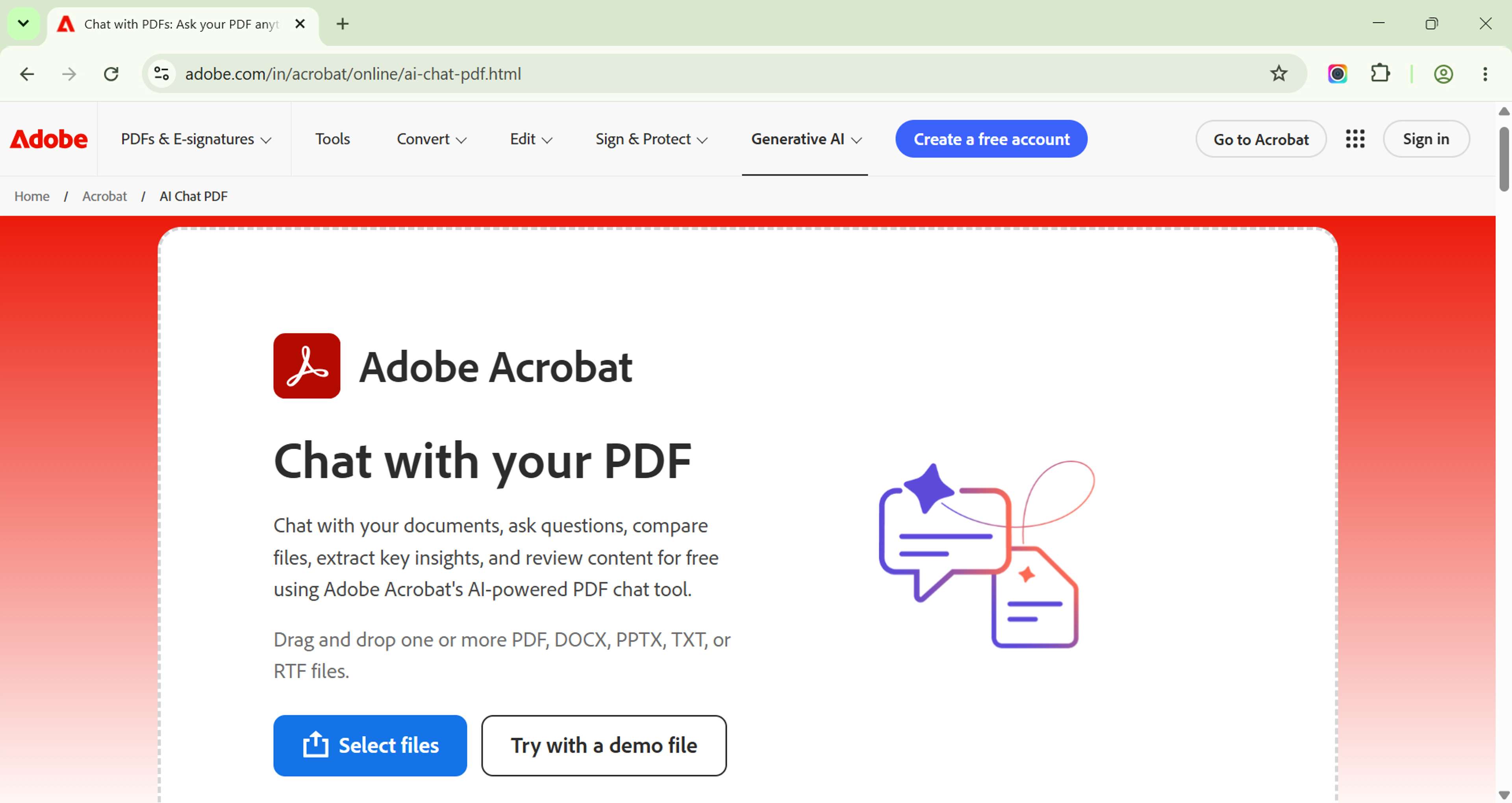
Step 1: Upload Your PDF
Drag your file into the upload area. The tool handles files up to 100MB and documents with hundreds of pages. It works with standard PDF files, scanned PDFs with OCR, and password-protected files after you open them. Your file travels over an encrypted link and is deleted from our servers right after processing.
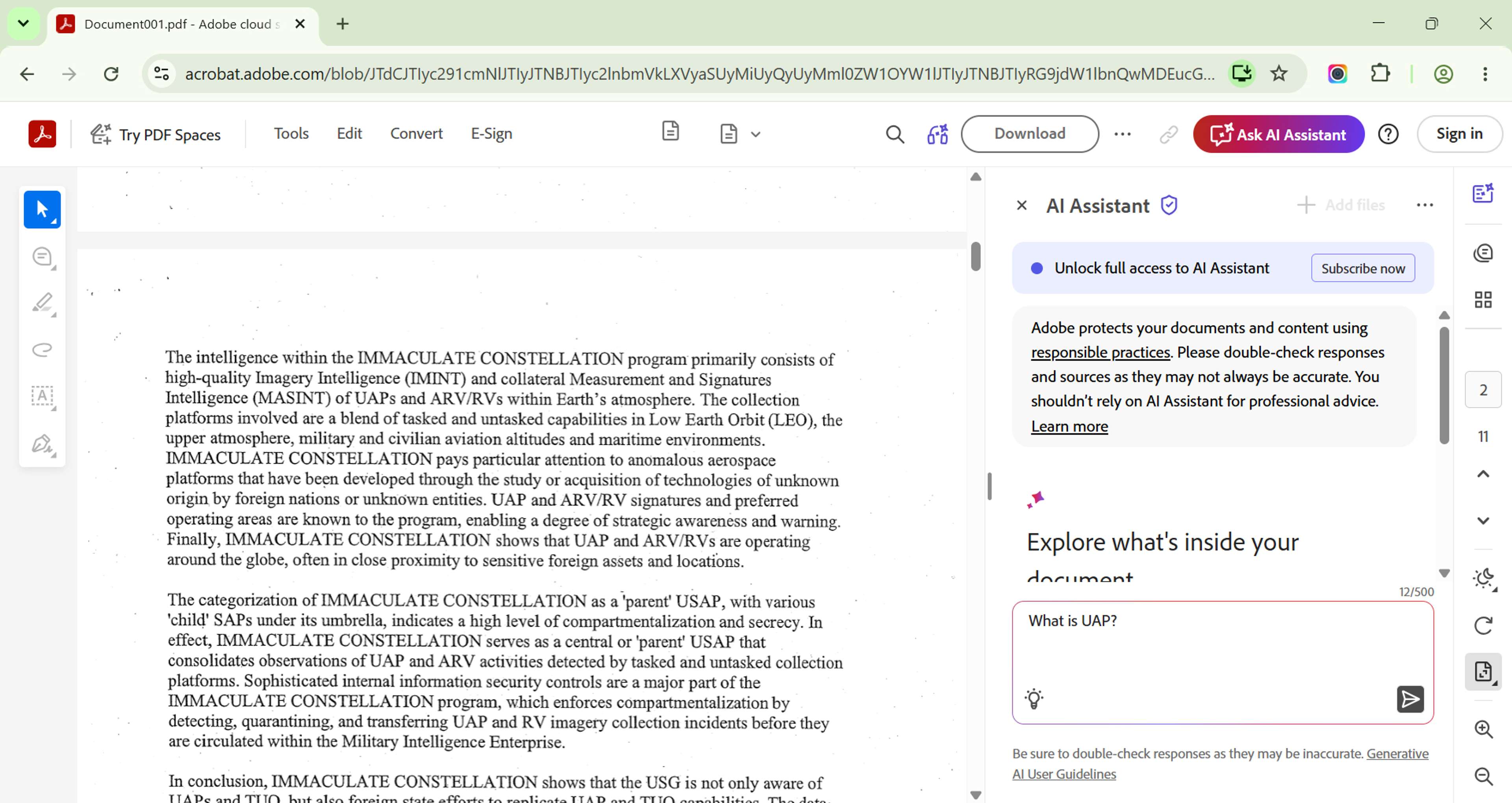
Step 2: Ask Your Question
Type naturally. No special syntax needed. Try patterns like "What are the main conclusions?", "Summarize the methodology used", "What does section 3 say about liability?", "Find all mentions of termination clauses", or "Extract the key financial projections". Be specific. "What is the interest rate?" gets you a direct answer. "Tell me about money" might return unrelated stuff.
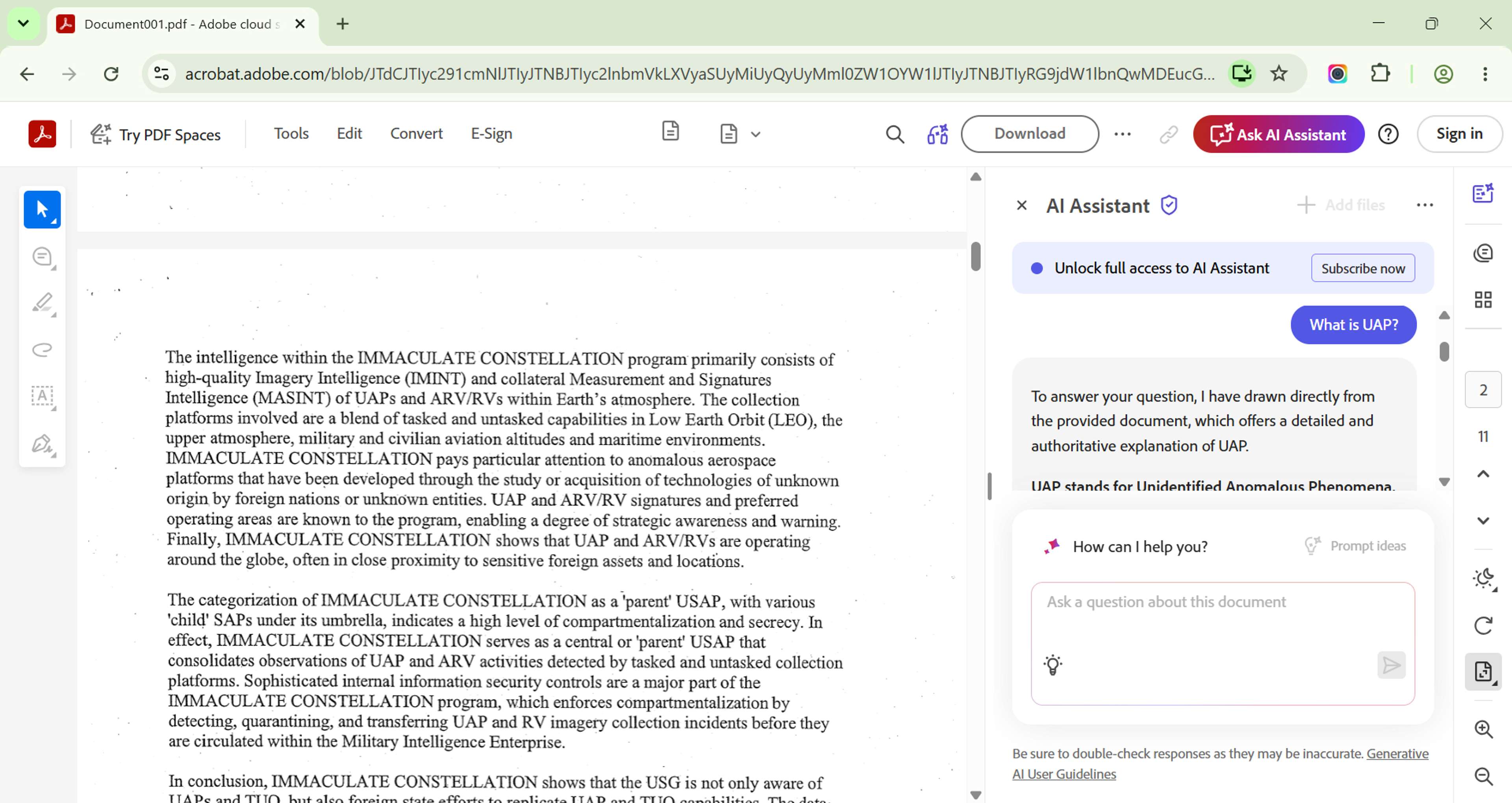
Step 3: Get Instant Answers with Citations
The AI gives you an answer with highlighted source references. You can click the citation to jump to that spot in the document, ask follow-up questions to dig deeper, get summaries of specific sections, and compare info across different parts. Every answer shows page numbers and exact text. You can verify everything and explore further.
Tips for Getting Good Answers
Be Specific in Your Questions
Vague questions get vague answers. Skip "What does it say about payments?" and try questions like "What are the payment terms and due dates?", "What happens if payment is late?", or "Are there early payment discounts?". Specificity keeps the AI focused on exactly what you need.
Ask Follow-Up Questions
Build on what you learn. Start with "What are the main termination conditions?", then follow with "Are there penalties for early termination?", and finish with "Can the contract be extended beyond the initial term?". Each follow-up adds context so you don't repeat yourself.
Use It for Contracts, Legal Docs, Research
For contracts, check obligations, liabilities, termination clauses, and hidden fees before signing. For legal documents, pull case citations, legal definitions, and procedural requirements. For research papers, understand methodology, evaluate findings, and find supporting data without reading the whole thing. Pair this with OCR tools for scanned documents.
Who Benefits Most?
Students and Researchers
Academic literature review means reading dozens of papers. Chat with PDF speeds that up by pulling key findings from multiple papers in minutes, comparing methods across studies, finding specific data points for thesis work, and helping you understand complex content through conversation. A grad student studying climate data could ask about projected temperature increases by 2050 across 20 research papers — faster than manually reading one paper.
Legal and Compliance Teams
Legal pros review contracts every day. Chat with PDF helps by cutting due diligence reviews by 30%, spotting non-standard clauses in vendor agreements, pulling key terms for summary tables, and cross-referencing clauses across multi-document deals. Associates spend 40-60% of contract review time hunting for specific info. AI chat cuts that to seconds.
Business Professionals
CEOs reviewing acquisition documents, CFOs analyzing financial reports, HR managers interpreting policy handbooks, and sales teams getting briefed on proposal terms all benefit from pulling specific information from long documents quickly. If you regularly work with contracts, consider also learning how to sign PDFs digitally to complete your document workflow.
Free Chat with PDF Tool — No Signup Required
Try our AI-powered chat with PDF tool at no cost — no account creation, no watermarks, no usage limits. The tool is free for unlimited documents, works on any device with a browser, processes docs in under 10 seconds, has no file size restrictions, and all processing happens in-memory with auto-deletion.
Upload your first PDF and ask your first question in under 30 seconds.
Related Tools and Resources
- Convert PDF to Text — Pull raw text for analysis
- How to Sign PDF — Complete document workflows
- How to Convert PDF to Word — Edit PDF content
- Fill PDF Form — Complete digital forms
Frequently Asked Questions
Is my document secure?
Yes. Files are encrypted during upload, processed in-memory, deleted right after. No data is stored or shared.
What types of PDFs work best?
Text-based PDFs with selectable text give the most accurate results. Scanned docs work too with OCR.
Can I ask follow-up questions?
Yes. The conversation keeps context so you can explore topics through multiple questions.
What's the maximum file size?
100MB per document, with no limit on page count.
Does this work on mobile?
Yes. The tool is fully responsive and works on smartphones and tablets through any modern browser.