
To combine resumes into one PDF, add the files to Merge PDF in the order you want, drag the pages into place and click Save & Download. Job seekers use this to put a resume, cover letter and references into the single file an application asks for, and recruiters use it to build one packet of shortlisted resumes for a hiring panel.
Merge PDF runs in your browser. The resumes, with their contact details and work histories, are not uploaded to our server.
How do I combine resumes into one PDF?
Convert any Word files to PDF first, open Merge PDF, choose all the PDFs, drag the page thumbnails into order and click Save & Download. Then open the merged file and check that every document is complete.
Combine Resumes Into One PDFCombine Your Resume, Cover Letter and References Into One PDF
Combine your documents only when the employer asks for one file or the form has a single upload field. If there are separate fields for a resume and a cover letter, upload two files, as the guide to compressing a PDF for a job application also advises.
Follow the order the posting names. If it names none, put the cover letter first so it introduces the resume, then the resume, then references, certificates or a portfolio sample.
Turn Word Files Into PDFs First
Merge PDF accepts PDF files only. Convert a DOCX resume or cover letter with Word to PDF, or export it as PDF from your word processor, and check the PDF before merging. Word to PDF converts on our server, so use your word processor’s export if nothing should leave your device.
If an employer asks for the resume as an editable Word file instead, the guide to converting a resume PDF to Word for ATS covers that request.
Name the File and Watch the Size
Give the combined file a plain name such as First-Last-Application.pdf, because Merge PDF downloads it as MergedPDF.pdf. If the merged file is over the portal’s limit, compress it once as the merge and compress workflow describes.
Combine Candidate Resumes Into One PDF for a Hiring Panel
Tie the packet to one job opening and one stage, for example five finalists for a Thursday panel. A packet with every applicant exposes more personal data than reviewers need and goes stale as soon as the shortlist changes.
Keep the applicant tracking system as the record of applications, stages and decisions. The PDF is a dated review copy for one meeting.
Choose an Order Reviewers Can Name
Alphabetical order avoids implying a ranking, and interview order matches the panel schedule. State the rule on a cover page so nobody reads meaning into a candidate’s position.
Leave Candidate Documents Unchanged
Do not rewrite bullets, standardize fonts or remove sections to make the packet look uniform. Each resume stays the candidate’s own document.
If reviewers need to cite pages, stamp packet page numbers in an empty margin with Add Page Numbers. Check that the numbers do not cover a candidate’s own footer or page numbers.
How to Combine Resumes Into One PDF
- Collect the documents as PDFs and name them with number prefixes in the order you want, such as
01-cover-letter.pdf. - Open the Merge PDF tool, click Choose Files and select all the PDFs. Each file can be up to 25 MB.
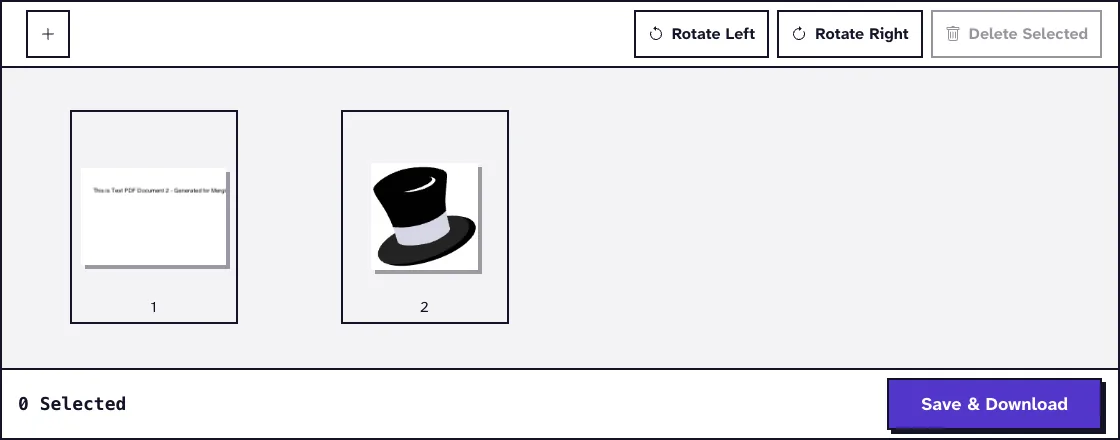
- Every page appears as a numbered thumbnail. Drag pages into the right order and use the plus button to add a file you forgot.
- Click a page to rotate or delete it, or select several and use Rotate Left, Rotate Right or Delete Selected.
- Click Save & Download and rename
MergedPDF.pdfto a clear name. - Open the merged file and run the checks below before you send or upload it.
A password-protected PDF is refused, including one that opens normally but restricts changes. Ask for an unprotected copy rather than working around the protection.
Check the Combined PDF Before You Send It
Write down the expected page count of each document before merging. A duplicated second page can make the total look right while another document is missing.
Open the merged file from your Downloads folder. Confirm that each document starts on the expected page, that each name appears on its first page and that the last page of each document ends naturally.
Click email addresses, portfolio and LinkedIn links to make sure they still work. Search for each surname as a quick extra check, though image-only scans will not show up in a search.
Privacy, Sharing and New Versions
Because Merge PDF works in your browser, combining resumes does not send them to us. Sharing the result is a separate step, so send it only through the channel the employer or your HR team approves.
For a hiring panel, state whether reviewers may download or forward the file. The EEOC page on recordkeeping requirements says that employers covered by federal anti-discrimination laws must keep all personnel or employment records for one year, so ask HR how long review copies are kept.
If the shortlist changes, send a dated replacement and say which earlier packet it replaces. Reusing the same file name leaves the panel unsure which slate it reviewed.
Frequently Asked Questions about Combining Resumes into One PDF
Are the resumes uploaded when I combine them?
No. Merge PDF builds the combined file in your browser, and nothing is sent to our server.
Can I combine a Word resume with a PDF cover letter?
Yes, after converting the Word file to PDF with Word to PDF or your word processor. Merge PDF only accepts PDF files.
Should I combine my resume and cover letter?
Only when the employer asks for one document or offers one upload field. Where separate fields exist, upload each document in its own field.
Does merging change the resume formatting?
No. Merge PDF copies the pages as they are, so fonts and layout stay as they were in each PDF.
What order should a recruiter use for a panel packet?
Alphabetical or interview order is easy to explain. If a ranking is intended, label it clearly on the cover page.