
To merge PDF documents for a tax return, put your W-2s, 1099s, receipts and statements in the order your preparer’s checklist uses, then combine them with Merge PDF and check every page of the result. Merge PDF runs in your browser, so your tax documents are not uploaded to our server.
A merged packet is a review or delivery copy for a preparer or an upload portal. It does not file a return, and this guide does not decide which records you need or how any item is reported.
How do I merge PDF documents for a tax return?
Make a list of every document your preparer asked for, name the files in that order, add them to Merge PDF and drag the pages into place. Then download the packet and check it against the list, page by page.
Build a Tax PDF PacketBuild the Packet From Your Preparer’s List
Start with the document list from your preparer or the upload portal. Turn it into a simple checklist with one line per item: tax year, taxpayer, document type, issuer, expected page count and status.
Statuses such as received, waiting for a correction, not yet available and not applicable say more than an empty box. A merged PDF can look complete while a whole income source is missing, so the checklist stays the record of what should be there.
Ask whether the recipient wants one PDF at all. Some preparers prefer separate files per category, and some portals have their own upload fields.
Keep Different Taxpayers and Years Apart
A household folder may hold records for spouses, dependents, a sole proprietorship, a rental property and a prior-year amendment. Give each group its own section or its own file, and check the name and year printed on each document rather than the file name a bank or payroll portal gave it.
Put Tax Documents in a Reviewable Order
Follow your preparer’s organizer if there is one. Otherwise, a workable order is an index page, then income documents grouped by type, then payment confirmations, then supporting records by category.
Number the source files to match, for example 01-W2-Employer.pdf and 02-1099-INT-Bank.pdf. Keep full Social Security and account numbers out of file names.
Keep Multi-Page Statements Whole
A Form W-2 reports one employee’s wages and withheld taxes, while brokers and banks often send a Form 1099 package. According to Wikipedia’s Form 1099 entry, a payer can send one combined Form 1099 that lists all of a payee’s 1099 transactions for the year.
Keep such a statement complete unless your preparer asks for selected pages. A page that looks like boilerplate may be the continuation needed to read a transaction.
Add an Index Page
After merging, list each section and the packet page where it starts. If a form has not arrived, note that on the checklist instead of inserting a placeholder page that could be mistaken for an issuer document.
How to Merge PDF Documents for a Tax Return
- Put downloaded tax PDFs and clear scans in one working folder, and keep the untouched originals elsewhere.
- Compare every file with your checklist and add number prefixes that match the packet order.
- Open the Merge PDF tool, click Choose Files and select the PDFs. Use the plus button to add more files later.
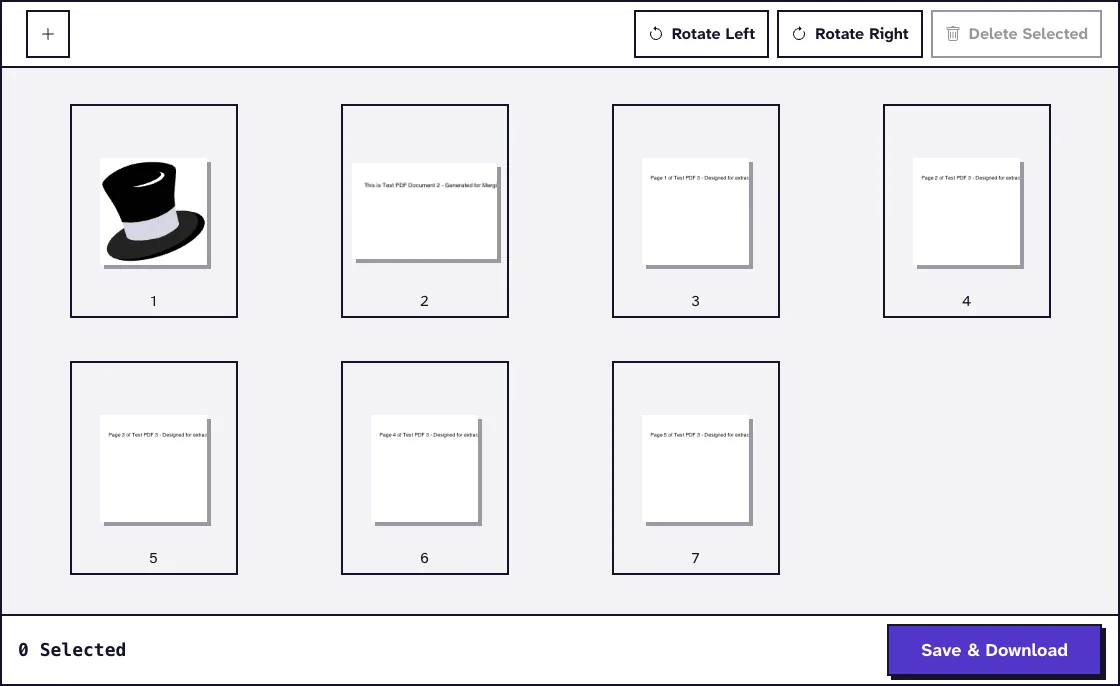
- Every page appears as a thumbnail. Drag pages into the right order, and click a page to rotate or delete it.
- Click Save & Download. The merged file downloads as
MergedPDF.pdf. - Rename it with the tax year and a version date, open it from your Downloads folder and check every section boundary.
Merge PDF builds the new file in your browser with the open-source pdf-lib library. Nothing is sent to a server, which matters for documents full of identity and income data.
Each file can be up to 25 MB. In our test, two small test files of 4.9 KB and 909 B became a 4.7 KB merged PDF with two pages.
Check the Merged Tax PDF Against Your List
Check the packet against the checklist, not against memory. Open the first and last page of every section, confirm the page totals and read every continuation statement in full.
For wage and income forms, check the taxpayer, tax year and issuer. Count forms as well as pages, because a duplicate can hide a missing form while the total page count still looks right.
Receipts and donation acknowledgements often arrive as phone photos. Turn them into PDF pages with JPG to PDF, which converts them on our server and deletes them automatically within two hours, and include the back of a page when it carries information.
Send Tax Records Securely
Use the secure upload channel your preparer names and confirm the account before you send. Do not repeat Social Security numbers or account numbers in file names or email subjects.
Protected PDFs and Fillable Tax Forms
Merge PDF refuses password-protected files, including files that open normally but restrict changes. Ask the issuer for an unprotected copy, or remove the password with Unlock PDF when you know it and are allowed to.
Fill in and save fillable forms before you merge them. Then check in the merged file that every typed value is still visible.
Fix File Size and Scan Problems
A merged packet keeps every source page, so it can be large. If an upload portal has a limit, keep the full-quality packet and compress a copy, as the guide to merging and compressing PDFs online explains.
Unlike merging, compression uploads the copy: Compress PDF processes it on our server and deletes it automatically within two hours. For a specific limit, the guide to compressing a PDF under 5MB shows how to measure the result.
Rescan a page when a phone photo cuts off corners, shows glare or makes figures uncertain. Crop only background, never issuer text or page numbers.
Handle Corrected Forms and Keep the Sources
Employers file a Form W-2c when a W-2 needs a correction. Ask your preparer whether the earlier version should stay in the packet, then rebuild the packet from the source folder so the corrected form is clearly marked.
Give each delivered version a date or revision number and say whether it replaces the previous one. Keep the delivered PDF, the checklist, the sources and the delivery confirmation as your records policy requires.
Closing statements from a home purchase can also be tax records. Pick only the requested pages from the closing archive described in the guide to merging PDFs for a real estate closing rather than attaching the whole file.
Frequently Asked Questions about Merging PDF Documents for a Tax Return
Does combining documents file my tax return?
No. A merged PDF is an organizing or delivery copy, and filing follows the process of the tax authority or an authorized service.
Are my tax documents uploaded when I merge them?
No. Merge PDF combines the files in your browser, and nothing is sent to our server.
Should every tax document go into one PDF?
Only when the preparer or upload system asks for it. Keep different years, taxpayers and businesses apart as instructed.
What should I do with a corrected form?
Ask your preparer whether it replaces or accompanies the earlier form, then rebuild the packet and give it a new version date.
Can I delete the source documents after merging?
No. Keep the sources and every version you delivered, according to the record-keeping rules that apply to you.